Apps, Shortcuts & Mac Controls
Make your Mac
do something.
Open any app, or bring it forward. Jump to the tab that matches a URL. Run a Shortcut on your iPhone, for Apple TV and Home, or on your Mac. And reach Mission Control, Show Desktop, Spotlight, Lock Screen, and window controls with a single tap.
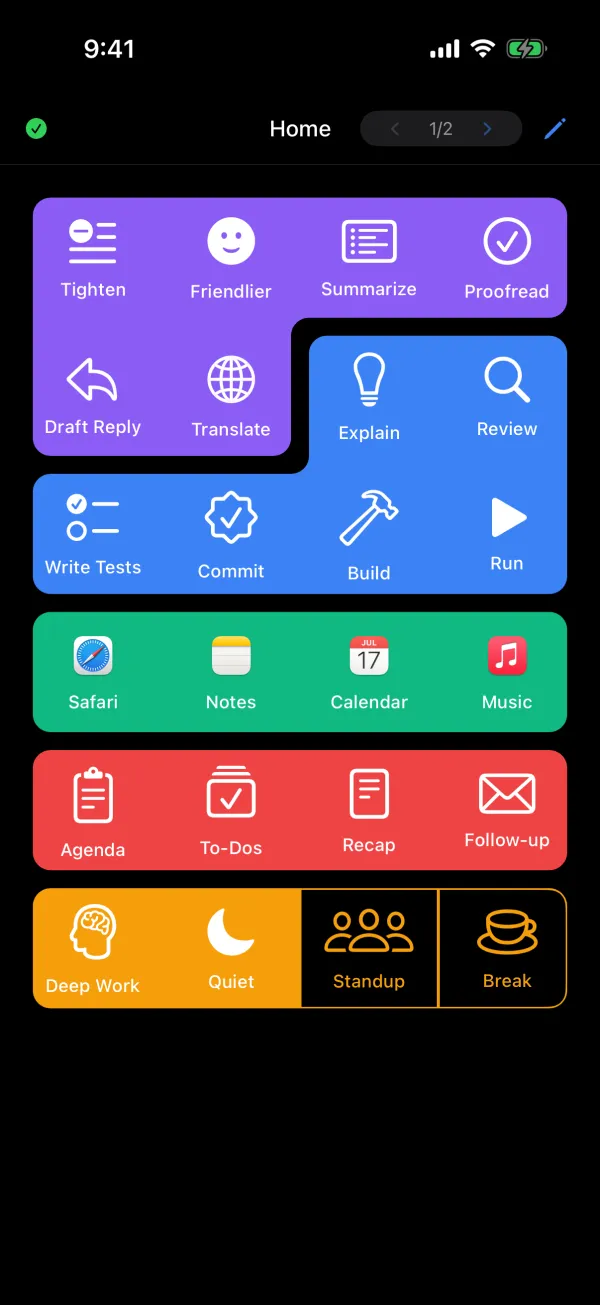
Launch App
Open any app.
With its real icon.
A Launch App button opens an app, or brings it forward if it’s already running. Your Mac sends the app’s actual icon, so the button looks like the app.

Tabs, Shortcuts, and the system.
Switch Tab.
Jump to the Safari or Chrome tab that matches a URL, across every window. Match by contains, starts with, or exact.
Run Shortcut.
Run a Shortcut on your iPhone, for Apple TV, Home, and other iPhone-only actions. Or run it on your Mac.
System Action.
Mission Control, Show Desktop, Spotlight, Lock Screen, and window controls, one tap each.
Every system action.
- Mission Control
- Show Desktop
- App Exposé
- Launchpad
- Spotlight
- Lock Screen
- Notification Center
- Minimize
- Full Screen
- Close Window
- Next Window
- Previous Window
Browser tabs and some system actions use macOS Automation permission. Health Check in PromptDeck for Mac shows anything that’s missing.
Build the deck your Mac deserves.
Free for Mac. iPhone beta now open.
iPhone app in beta on TestFlight. We’ll email you an invite.
Download PromptDeck for Mac