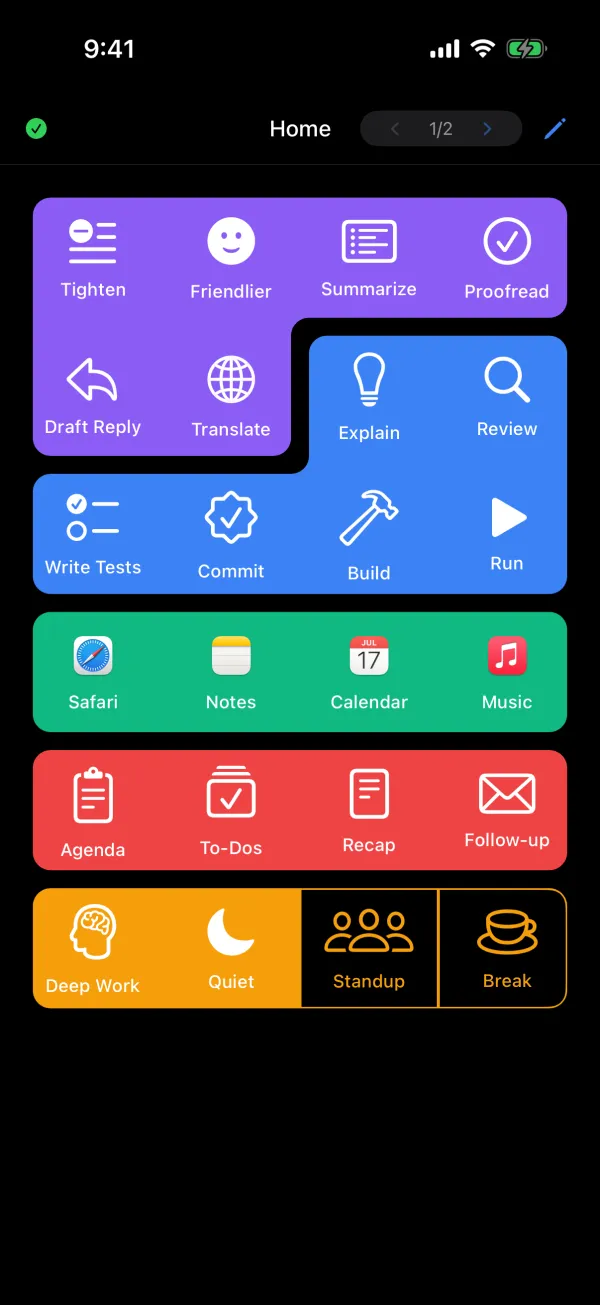
Inject prompts, switch apps, navigate Spaces, find tabs — all with one tap.
Coming to the App Store
You're on the list. We'll let you know.
Three steps. No cloud. No accounts. Just your devices on the same network.
Choose a button on your iPhone — prompts, app launchers, shortcuts, system actions.
The command travels instantly over your local network. Under 50ms.
Text appears at your cursor. Apps launch. Tabs switch. Spaces navigate. Instantly.
More than a prompt injector. A complete remote control for your Mac.
Paste prompts, snippets, and commands exactly where your cursor is. Clipboard auto-restores.
Learn moreJump to any Safari or Chrome tab by name. No more hunting through dozens of tabs.
Learn moreSwitch macOS Desktops from your phone. Faster than any keyboard shortcut.
Learn moreMirror your Dock on your iPhone. Launch and focus any app with one tap.
Learn moreButtons auto-change based on active app, Desktop Space, or WiFi network.
Learn moreRun any iOS or macOS Shortcut with one tap. Control your Apple TV via Shortcuts.
Learn moreTrigger webhooks, control smart home devices, call external APIs. Credentials stored in macOS Keychain.
Learn moreScan QR codes and barcodes with your iPhone camera. Route scanned data to lists, URLs, or text injection.
Learn moreBuild your deck on your iPhone. Add buttons, sections, and pages, and see every change as you make it.
Learn moreDesigned for power users who want total control.
Organize buttons into pages and sections with custom colors, icons, and labels. Swipe between pages to switch contexts.
Sort alphabetically, filter by triggers, or keep your own hand-crafted order. Every detail is configurable.
PromptDeck monitors your active app, Desktop Space, and WiFi network. Pages switch automatically based on what you're doing.
Open Xcode and your dev tools appear. Switch to Desktop 3 and your design page loads. Connect to work WiFi and your work buttons show up.
Tap the pencil to edit your deck in place. Add buttons, sections, and pages, drag them into order, and set colors, icons, and triggers in the inspector.
Changes show up as you make them. Your Mac saves each edit and sends it to every connected phone.
See how editing worksBuilt for developers who value speed, privacy, and control.
Text injection in under 50ms over your local network. No cloud roundtrip. No lag.
Everything stays on your local network. No cloud services. No accounts. No telemetry.
Your deck lives on your Mac, not in someone else's cloud. No vendor lock-in. Make it yours.
Up and running in under two minutes.
Download PromptDeck for Mac and drag it to Applications.
Enable Accessibility permission in System Settings so it can inject text.
Open the iOS app, enter the PIN shown on your Mac, and start tapping.
macOS 15.5+ · Apple Silicon · Free & open source